




Repair
Repair Price: $ 2,724.00
Purchase
CSL Part Number: 87404
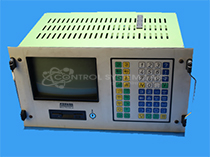
Product Overview: An operator workstation combining a CRT monitor with an integrated processor board mounted on the rear, serving as the human-machine interface for injection molding machines. It displays process parameters and accepts operator input for machine control. Floppy-based data storage is standard.
Category: Operator / Monitor Workstation
Manufacturer: Arburg
Manufacturer Part Number: 221M250-55U
Series: Multronica Hydronica
Please include disks, key and your wiring diagram when sending in your MULTRONICA.
We can repair the entire system, or the individual boards
Common Failures
Common issues reported with this product include failure to power up, dim or unreadable displays, and unexpected reboots during operation.
Repair Approach
Repairs addressed display issues through capacitor replacement in the monitor and power supply sections. An overheated resistor on the CRT socket PCB was replaced. Additional work included replacing electrolytic capacitors on a key board and repairing broken connections that affected proper operation.
Testing & Quality
Following repairs, the unit underwent extended burn-in testing to verify stability, and voltage supplies were confirmed within specification. Testing was conducted to the extent possible with available equipment, and the unit operated without the previously reported faults.
Service and repair your broken Arburg part
We can repair your Arburg model 221M250-55U in our facility. Let our skilled technicians get your Arburg back in operation quickly.
Step 1 - Click the green 'Repair Now' button above to add the part and then complete the RMA.
Step 2 - The RMA form will be sent to you via email. Print the RMA form and put it in a box with the item(s) for repair.
Step 3 - Ship or mail the box to the address listed on the RMA.
Once the user has seen at least one product this snippet will be visible.