


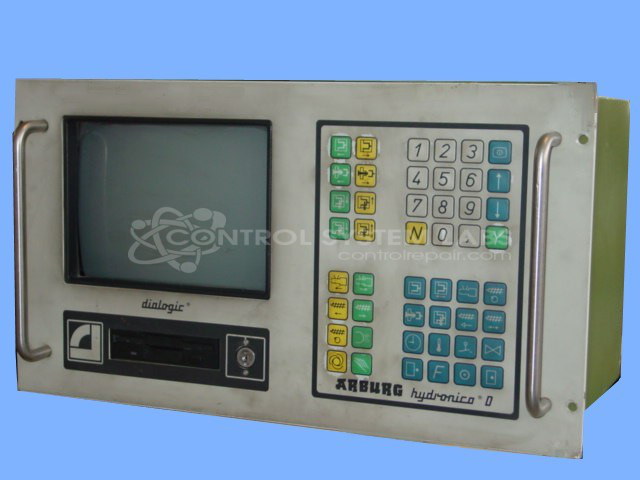
Arburg 270-90-350 Hydronica D Control Panel with CRT
Repair
Repair Price: $ 4,448.00
Purchase
CSL Part Number: 19105
Product Overview: The Hydronica D Control Panel with CRT is an operator interface and system controller for Arburg plastic injection molding machines. It features a CRT display and manages machine functions including clamping unit control and injection unit control through a modular card-based architecture with CPU and I/O cards. The system uses CF card media for software and parameter storage. This control panel is commonly found on Arburg 320-210-750 series molding machines and is part of the Multronica Hydronica control family.
Category: Control Panel
Manufacturer: Arburg
Manufacturer Part Number: 270-90-350
Series: Multronica Hydronica
Include a detailed problem and (2) diskettes when sending in the repair.
Common Failures
Units may exhibit issues such as the system not recognizing the system disk or error messages indicating that certain modules are not communicating with the CPU card. These symptoms can be related to software configuration or compatibility.
Repair Approach
We would be glad to review the item to determine the root cause. Once the unit is received and reviewed, we can provide a quotation before charges are incurred. Repairs may involve verifying software compatibility, confirming I/O functionality on relevant cards, and adjusting display settings such as vertical linearity, position, contrast, and brightness as needed.
Testing & Quality
Following repair work, the unit undergoes testing and review by qualified personnel to verify functionality. Where applicable, updated software media may be provided to support system operation.
Service and repair your broken Arburg part
We can repair your Arburg model 270-90-350 in our facility. Let our skilled technicians get your Arburg back in operation quickly.
Step 1 - Click the green 'Repair Now' button above to add the part and then complete the RMA.
Step 2 - The RMA form will be sent to you via email. Print the RMA form and put it in a box with the item(s) for repair.
Step 3 - Ship or mail the box to the address listed on the RMA.
Once the user has seen at least one product this snippet will be visible.