


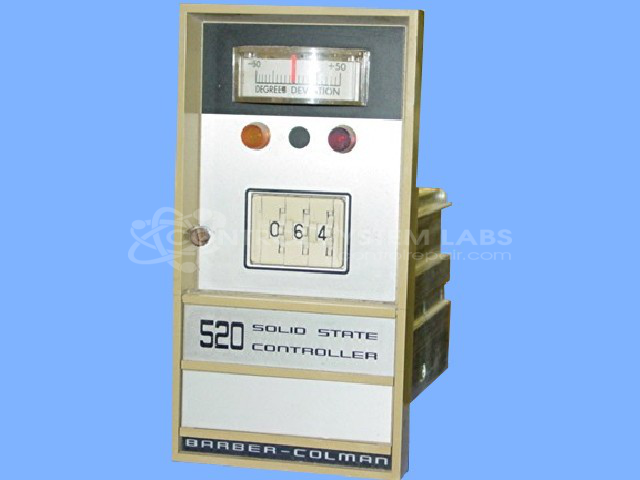
Barber-Colman 522B-40015-030-0-06 Single Smart Speed Switching Output Controller, Analog Set and Read


Repair
Repair Price: $ 392.00
Purchase
CSL Part Number: 70137
Product Overview: A digital setpoint temperature controller with proportional time-proportioning output for smart speed switching control. It provides analog setpoint entry and reading, handling 10 A inrush and 1 A continuous at 24-240 Vac. The cycle time adjusts from 6-60 seconds, field-changeable to 0.6-6 seconds. Common in paper and industrial process heating.
Category: Temperature Control
Manufacturer: Barber-Colman
Manufacturer Synonyms: Barber Coleman, Barbercolman, Invensys
Manufacturer Part Number: 522B-40015-030-0-06
Series: 520 Series Digital Setpoint Controller
Brand: Barber-Colman
Common Failures
A frequent issue with this product is a non-calibrated meter caused by sticking movement and marginal filter capacitors. These problems affect the meter's ability to accurately respond to input.
Repair Approach
To address the calibration and movement issues, faulty capacitors and the meter are replaced. The input terminals may be upgraded with gold contacts to enhance performance and reliability.
Testing & Quality
After repairs, the product undergoes recalibration and an overnight burn-in test to verify accurate operation and stability.
Service and repair your broken Barber-Colman part
We can repair your Barber-Colman model 522B-40015-030-0-06 in our facility. Let our skilled technicians get your Barber-Colman back in operation quickly.
Step 1 - Click the green 'Repair Now' button above to add the part and then complete the RMA.
Step 2 - The RMA form will be sent to you via email. Print the RMA form and put it in a box with the item(s) for repair.
Step 3 - Ship or mail the box to the address listed on the RMA.
Once the user has seen at least one product this snippet will be visible.