




Repair
Repair Price: $ 748.00
Purchase
CSL Part Number: 12379
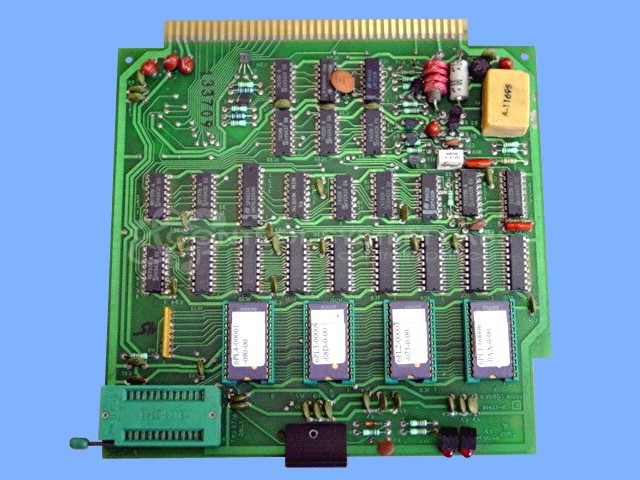
Product Overview: A PROM loader board used within MACO process control systems for machine automation, commonly found in paper manufacturing and converting equipment. It handles loading and execution of programmed EPROM memory, interfacing processor logic with stored control data. Features gold-plated edge connectors for reliable signal contact.
Category: Barber Colman MACO Controls
Manufacturer: Barber-Colman
Manufacturer Synonyms: Barber Coleman, Barbercolman, Invensys
Manufacturer Part Number: A-11914
Series: MACO
Brand: Barber-Colman
Common Failures
This product has been received for evaluation with reported issues such as blown fuses, processor errors, and operational interruptions. When received with these symptoms, we review the unit to identify components that may require replacement.
Repair Approach
Repairs may involve replacing integrated circuits, capacitors, or other components identified during evaluation. Once the unit is received and reviewed, we can provide a quotation before any repair work begins. Successful repairs are determined through testing following component replacement.
Testing & Quality
Repaired units are tested to confirm proper operation. Testing durations vary based on the nature of the repair and the unit's intended application. We evaluate stability and functionality before the unit is prepared for return shipment.
Service and repair your broken Barber-Colman part
We can repair your Barber-Colman model A-11914 in our facility. Let our skilled technicians get your Barber-Colman back in operation quickly.
Step 1 - Click the green 'Repair Now' button above to add the part and then complete the RMA.
Step 2 - The RMA form will be sent to you via email. Print the RMA form and put it in a box with the item(s) for repair.
Step 3 - Ship or mail the box to the address listed on the RMA.
Once the user has seen at least one product this snippet will be visible.