




Repair
Repair Price: $ 484.00
Purchase
CSL Part Number: 26846
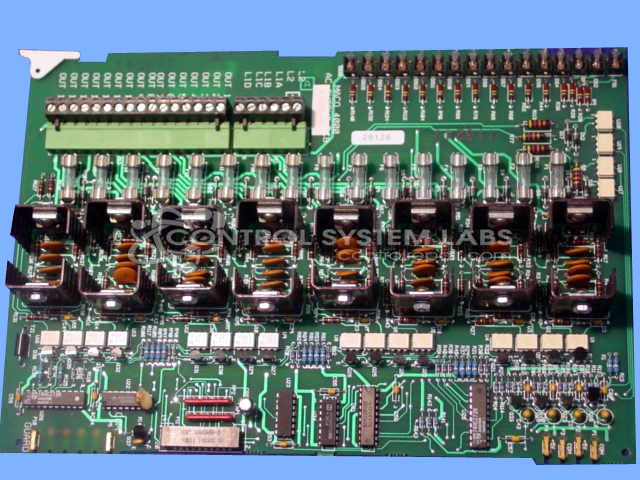
Product Overview: An AC output control board used in a process automation controller for industrial applications such as paper manufacturing. It provides timed AC output signals to drive connected equipment, with onboard fuse protection and output circuitry for sequencing and machine control functions.
Category: Control Board
Manufacturer: Barber-Colman
Manufacturer Synonyms: Barber Coleman, Barbercolman, Invensys
Manufacturer Part Number: A-13402-1
Series: MACO 4000
Brand: Barber-Colman
Common Failures
Common issues reported for this product include the time slot not functioning and power not turning on. Customers have noted problems with the time slot not running and issues preventing the unit from powering up.
Repair Approach
For the time slot issue, repairs have involved replacing specific fuses and a capacitor. This corrective action has successfully resolved the problem in some cases, with subsequent testing confirming proper operation. The power issue remains a recognized symptom that would require evaluation to determine the cause and repair approach.
Testing & Quality
Post-repair testing confirms the board's operational status to ensure the product meets performance standards. Quality checks are integral to the repair process to uphold product reliability.
Service and repair your broken Barber-Colman part
We can repair your Barber-Colman model A-13402-1 in our facility. Let our skilled technicians get your Barber-Colman back in operation quickly.
Step 1 - Click the green 'Repair Now' button above to add the part and then complete the RMA.
Step 2 - The RMA form will be sent to you via email. Print the RMA form and put it in a box with the item(s) for repair.
Step 3 - Ship or mail the box to the address listed on the RMA.
Once the user has seen at least one product this snippet will be visible.