




Repair
Call for price
Purchase
CSL Part Number: 67251
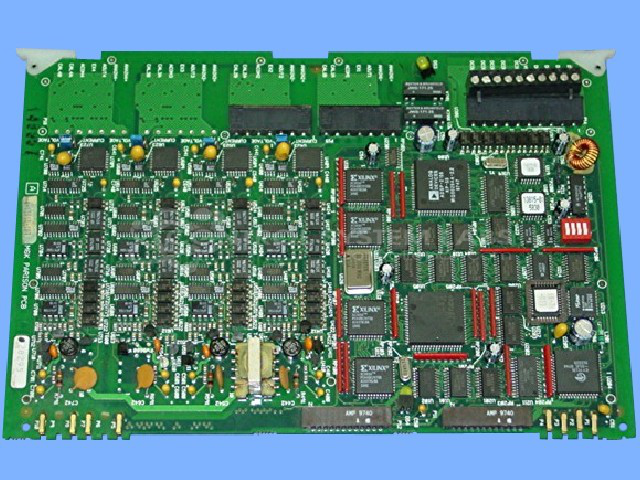
Product Overview: A two-channel parison programmer main board used in blow molding machine control systems. It processes parison profile commands and generates analog outputs to regulate wall thickness during extrusion. Part of a plastics process control platform, featuring configurable jumpers and switches for channel setup.
Category: Barber Colman MACO Controls
Manufacturer: Barber-Colman
Manufacturer Synonyms: Barber Coleman, Barbercolman, Invensys
Manufacturer Part Number: A-13815-107
Series: MACO 6500
Brand: Barber-Colman
Repair prices can vary. Email for current price.
Common Failures
This product may exhibit control faults or output issues. Reported symptoms have included persistent faults after installation and outputs that remain fixed at zero volts. Components that may require attention during evaluation include digital-to-analog converters, programmable array logic components, operational amplifiers, transistors, and opto-isolators.
Repair Approach
Once the unit is received and reviewed, we can provide a quotation before any repair work begins. Repairs typically involve the replacement of failed components identified during diagnostic testing. Our team has the capability to evaluate and repair a wide range of electronic issues.
Testing & Quality
Each repaired unit undergoes testing to confirm that identified faults have been addressed and that the unit meets functional requirements. Testing procedures are designed to verify stability and performance before the unit is returned to the customer.
Repair your broken Barber-Colman part
We can repair your Barber-Colman model A-13815-107 .
Please note: our repair turnaround time may be longer than our standard lead times for this item.
Step 1 -
Click the green button above, "Repair Now," and add to your RMA.
Step 2 -
Print the RMA form that is emailed to you, and put it in a box with the parts for repair.
Step 3 -
Mail the box to the address on the RMA.
You will be sent an authorization for repair via email. Your approval is needed before any work is started.
Once the user has seen at least one product this snippet will be visible.