


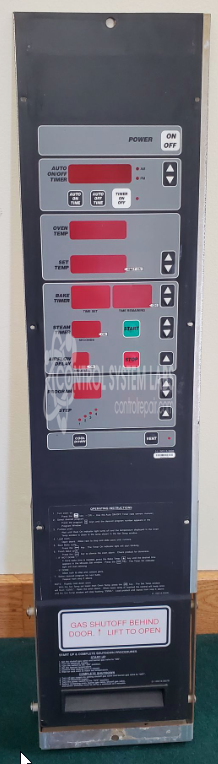
Baxter Manufacturing 01-100V16-580B Control Panel
Repair
Call for price
Purchase
CSL Part Number: 107489
Product Overview: The Baxter Manufacturing PC 414R2 Control Panel (01-100V16-580B) is an operator interface panel used in commercial food service equipment. This panel provides user control and monitoring functions for Baxter ovens and related cooking equipment, also marketed under Hobart, Baker's Aid, and Lucks brands. It typically features membrane switches or keypad controls with ribbon cable connections for signal transmission to the equipment's main control system.
Category: Operator & Control Panels
Manufacturer: Baxter Manufacturing
Alternate Manufacturer Names: Hobart, Baker's Aid, Lucks
Manufacturer Part Number: 01-100V16-580B
Other Synonyms: Hobart, Baker's Aid, Lucks
Please include control board with the operator panel when sending in.
Common Failures
Common issues reported include problems with the ribbon cable and control panel. These problems often manifest as unresponsive or malfunctioning keypad operations.
Repair Approach
Our repair approach typically focuses on addressing issues with the ribbon cable. Initial attempts may involve repairing the cable through crimping. In cases where repair is unsuccessful, replacement of the overlay keypad and cable assembly may be recommended.
Testing & Quality
Repairs involve component verification and power-up tests. Comprehensive system testing is not performed. Repairs are conducted on a Time & Materials basis and are billed for labor and material spent attempting repair. Time & Materials work is not warrantied. We encourage customers to provide detailed symptom descriptions and any available problem history to assist our evaluation and repair efforts.
Limited Repair
The Baxter Manufacturing part number is only available as a limited repair at our facility. Repairs to this item may be limited due to several reasons:
- Availability of parts
- Less than 100% test ability due to required support equipment
To have us attempt a repair on your Baxter Manufacturing part follow these steps:
Step 1 -
Click the Repair Now button above to add the part and complete the RMA form.
Step 2 -
Print the RMA form that is sent to your email, and put it in the box with the parts for repair.
Step 3 -
Mail the box to the address on the RMA.
After we receive your item, we will perform an inspection and an authorization to repair will be sent for your approval. Work will begin after your authorization is received.
Once the user has seen at least one product this snippet will be visible.