


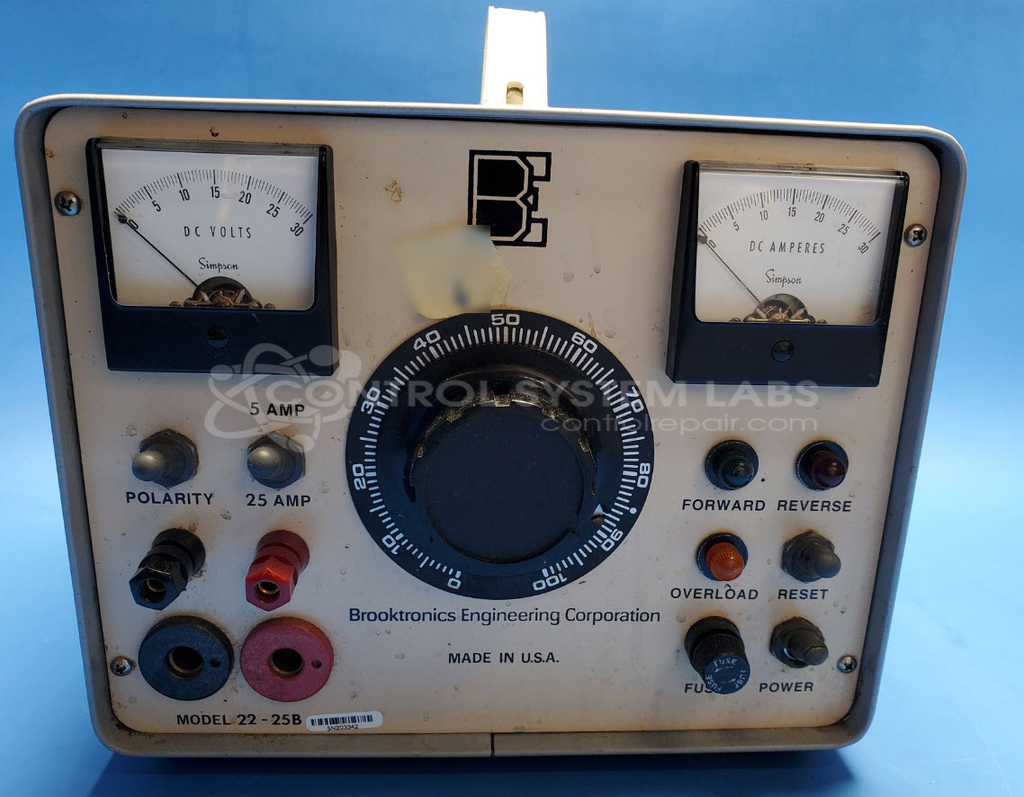
Brooktronics 22-25B Electroplating Power Supply
Repair
Repair Price: $ 484.00
Purchase
CSL Part Number: 103144
Product Overview: The Brooktronics 22-25B is a DC electroplating power supply delivering 0-30 volts at selectable current ranges of 0-5 or 0-25 amps. It features reversible polarity switching for applications requiring both anodic and cathodic processes, adjustable overload protection, and customer-accessible calibration controls. Commonly used in metal finishing operations including chrome plating, anodizing, and other electrochemical surface treatment processes.
Category: Power Supply
Manufacturer: Brooktronics
Manufacturer Part Number: 22-25B
Common Failures
Reported issues include no current flow through the device and difficulties applying current due to a defective switch terminal on the positive side. A broken rubber cover on the power switch has also been noted, but it does not affect overall functionality.
Repair Approach
The primary repair involves replacing the defective switch with a new component. This addresses the issue of no current flow and restores proper device operation.
Testing & Quality
Post-repair testing includes checking all dials and switches for functionality. Out-of-calibration issues, such as premature overload trigger, can be adjusted by the customer. A thorough 4-hour burn-in test at 17.4 volts with 5 amps in both polarities is conducted to verify proper performance. All tests confirm that the device meets required specifications for both polarities, amp levels, and overload protection.
Service and repair your broken Brooktronics part
We can repair your Brooktronics model 22-25B in our facility. Let our skilled technicians get your Brooktronics back in operation quickly.
Step 1 - Click the green 'Repair Now' button above to add the part and then complete the RMA.
Step 2 - The RMA form will be sent to you via email. Print the RMA form and put it in a box with the item(s) for repair.
Step 3 - Ship or mail the box to the address listed on the RMA.
Once the user has seen at least one product this snippet will be visible.