



Repair
Repair Price: $ 2,824.00
Purchase
CSL Part Number: 71870
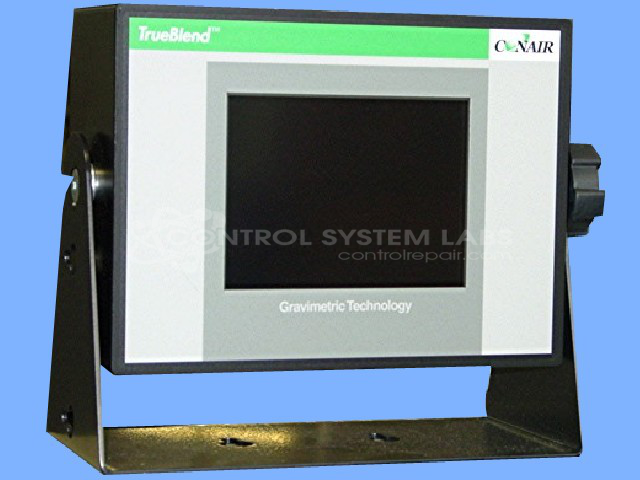
Product Overview: The TB 250 TrueBlend is a 5.7-inch touchscreen control assembly designed for Conair's TrueBlend gravimetric blending systems. It serves as the operator interface and controller for precision material blending in plastics processing applications. The unit features a 320x240 pixel LCD display with CCFL backlight, touchscreen interface with overlay, and multiple I/O ports for system integration. It operates gravimetric blenders commonly used in injection molding and extrusion operations where accurate plastic resin blending is critical.
Category: Control Assembly
Manufacturer: Conair
Manufacturer Synonyms: IPEG, Franklin
Manufacturer Part Number: 61426301
Series: TrueBlend Gravimetric Blender
Brand: TrueBlend
Send in your unit for a quote for touchscreen or LCD repair.
Common Failures
Common reported symptoms include the device not powering on, becoming stuck in bootloader mode, displaying only a loading screen, or the backlight functioning without displaying content on the screen.
Repair Approach
We perform diagnostic testing to identify faulty components. Components are replaced as needed based on evaluation findings. Testing procedures include functional testing of parts and verification of operation. Calibration and burn-in tests are conducted as part of the repair process.
Testing & Quality
Testing procedures include burn-in tests under load conditions and verification of communication ports. Repairs are reviewed by our technical team, and units are tested to CSL standards before being returned.
Service and repair your broken Conair part
We can repair your Conair model 61426301 in our facility. Let our skilled technicians get your Conair back in operation quickly.
Step 1 - Click the green 'Repair Now' button above to add the part and then complete the RMA.
Step 2 - The RMA form will be sent to you via email. Print the RMA form and put it in a box with the item(s) for repair.
Step 3 - Ship or mail the box to the address listed on the RMA.
Once the user has seen at least one product this snippet will be visible.