




Repair
Repair Price: $ 790.00
Purchase
CSL Part Number: 116347
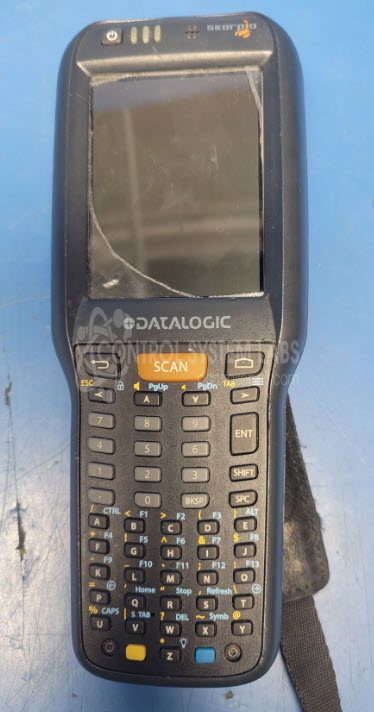
Product Overview: The Datalogic Skorpio X4 is a rugged handheld mobile computer designed for warehouse and logistics operations. It features a touchscreen display with keypad input and runs Android-based applications for inventory management, scanning, and data collection. Commonly deployed in distribution centers and retail environments, it supports mobile workforce applications during high-volume seasonal operations. The device uses replaceable batteries and is built to withstand industrial handling conditions.
Category: Computer Items
Manufacturer: Datalogic
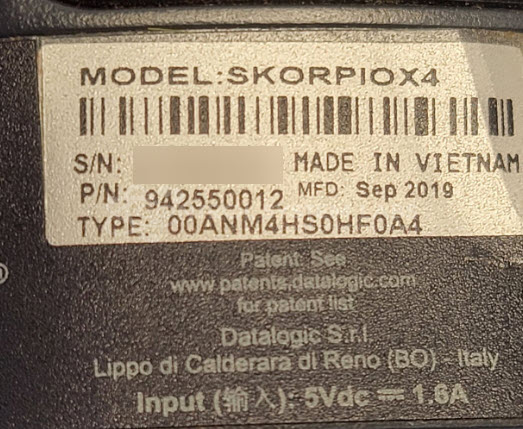
Alternate Manufacturer Names: SKORPIOX4
Manufacturer Part Number: 942550012
Also Known As(AKA): SKORPIOX4
Other Synonyms: SKORPIOX4
If LCD or Batteries are needed these will be quoted additional charge.
Common Failures
The Datalogic Skorpio X4 Handheld Terminals commonly experience issues such as cracked screens, battery connection problems, and keypad faults. These problems can affect device functionality.
Repair Approach
Repairs often involve screen replacement and battery replacement. Keypad issues may be addressed through contact cleaning and protective coating application. In cases where additional parts are needed, we can evaluate the unit and provide a quotation before any repair work begins.
Testing & Quality
After repair, devices undergo functional testing, including app navigation and screen touch accuracy verification. If the device cannot be repaired due to parts availability or other factors, we will contact you with findings and options before returning the unit.
Service and repair your broken Datalogic part
We can repair your Datalogic model 942550012 in our facility. Let our skilled technicians get your Datalogic back in operation quickly.
Step 1 - Click the green 'Repair Now' button above to add the part and then complete the RMA.
Step 2 - The RMA form will be sent to you via email. Print the RMA form and put it in a box with the item(s) for repair.
Step 3 - Ship or mail the box to the address listed on the RMA.
Once the user has seen at least one product this snippet will be visible.