




Repair
Repair Price: $ 1,464.00
Purchase
CSL Part Number: 80878
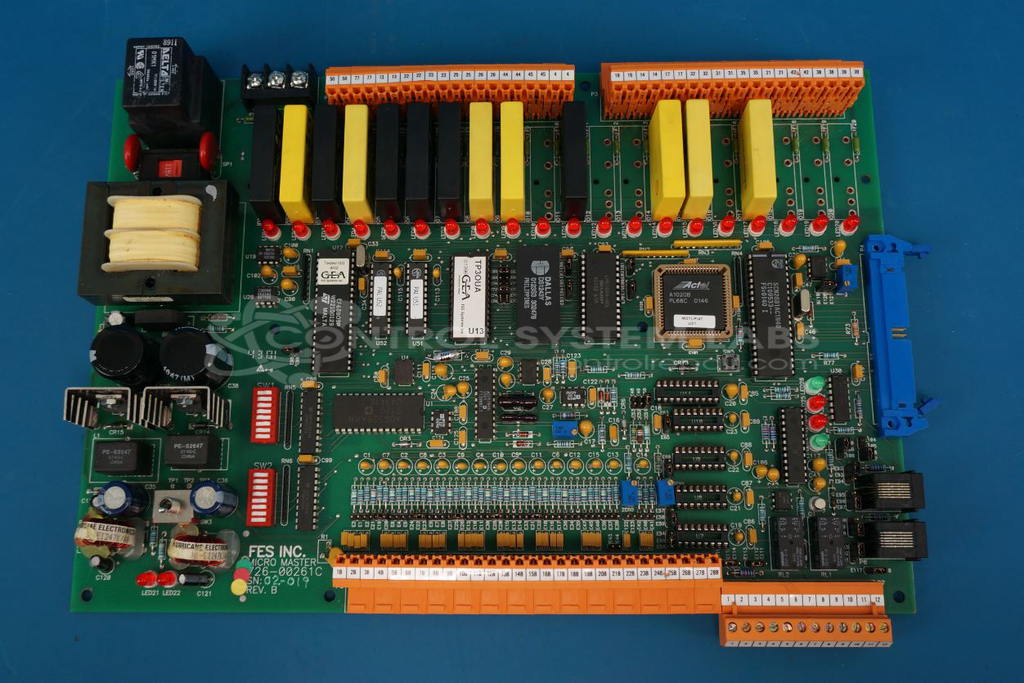
Product Overview: Microprocessor-based control board that monitors and regulates industrial refrigeration compressors. It reads pressure, temperature, and current inputs from sensors and drives output relays for functions such as oil heating and oil pressure control, displaying live operating values. Uses EPROM and battery-backed SRAM firmware with configurable jumpers and DIP switches.
Category: Control Board
Manufacturer: FES
Manufacturer Synonyms: FES GEA, FES Systems
Manufacturer Part Number: 726-00261C
Common Failures
Common issues reported by customers include intermittent failures, incorrect display readings, and system shutdowns. Problems such as flashing display numbers, incorrect pressure readings, and components not functioning as expected have been observed. In some cases, specific findings such as heavy flux deposits or solder bridges were identified during evaluation.
Repair Approach
Repairs typically involve component replacement and system updates, such as replacing EPROMs, regulators, and connectors. In several instances, cleaning of flux and correction of solder issues are performed. Some repairs require more specific interventions, such as setting jumper configurations and retrofitting regulators.
Testing & Quality
Following repair, units undergo testing including burn-in tests, load simulations, and verification of display stability over extended periods. Historical review shows that repaired units have maintained operational stability after repairs were completed.
Service and repair your broken FES part
We can repair your FES model 726-00261C in our facility. Let our skilled technicians get your FES back in operation quickly.
Step 1 - Click the green 'Repair Now' button above to add the part and then complete the RMA.
Step 2 - The RMA form will be sent to you via email. Print the RMA form and put it in a box with the item(s) for repair.
Step 3 - Ship or mail the box to the address listed on the RMA.
Once the user has seen at least one product this snippet will be visible.