




Repair
Repair Price: $ 856.00
Purchase
CSL Part Number: 71292
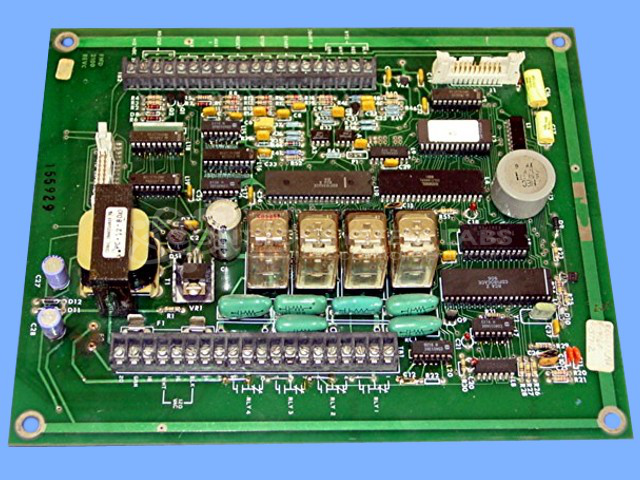
Product Overview: A control board that manages water metering and flow measurement operations. It features an EPROM-based microcontroller, latch logic, relay outputs, a display, and keypad interface for monitoring and control in industrial fluid-handling and oil equipment applications.
Category: Control Board
Manufacturer: Frontier Micro Controls
Manufacturer Part Number: FMD 2100 REV C
Also Known As(AKA): GENERAL OIL & EQUIPM
Repair requires display board 2100L along with this mother board.
Common Failures
Units received for evaluation have exhibited control-related issues such as faulty bridges, non-functional relays, missing components like EPROMs, and no display or keypad operation. Missing fuses and misaligned or missing relay clips have also been observed.
Repair Approach
Repairs typically involve replacing defective control components, such as bridges and relays, and ensuring all essential parts like fuses and relay clips are present. Electrolytic capacitors are replaced as a preventive measure. In cases with no display or keypad function, specific components including DC supplies and microchips may be replaced and verified for proper operation.
Testing & Quality
Post-repair testing includes verifying DC supplies and system operations to ensure functionality. Testing protocols involve diagnostic runs using a test EPROM to certify the repairs. Products are thoroughly evaluated before being returned to the customer.
Service and repair your broken Frontier Micro Controls part
We can repair your Frontier Micro Controls model FMD 2100 REV C in our facility. Let our skilled technicians get your Frontier Micro Controls back in operation quickly.
Step 1 - Click the green 'Repair Now' button above to add the part and then complete the RMA.
Step 2 - The RMA form will be sent to you via email. Print the RMA form and put it in a box with the item(s) for repair.
Step 3 - Ship or mail the box to the address listed on the RMA.
Once the user has seen at least one product this snippet will be visible.