




Repair
Repair Price: $ 728.00
Purchase
CSL Part Number: 1578
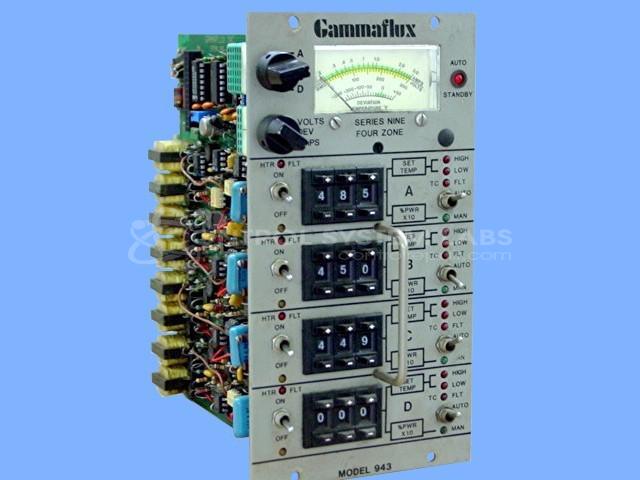
Product Overview: A four-zone temperature controller module with digital thumbwheel setpoint entry and analog metering of volts, deviation, and amps per zone. It regulates electric heater loads via triac outputs, supporting J-type thermocouples. Commonly used in plastic injection molding hot runner systems. Available in 115V and 220V configurations.
Category: Temperature Control
Manufacturer: Gammaflux
Manufacturer Part Number: 943
Series: 900 Series Temperature Controller
We have a complete test station to repair and test your Gammaflux controller while in operation. Send in your unit for our free evaluation. Switch replacement if required will be quoted after evaluation.
Common Failures
Units of this model may exhibit issues such as zones not turning on, inaccurate setpoint thumbwheels, blown fuses, and faulty ICs. Calibration problems, burnt resistors, and malfunctioning auto/manual switches may also occur, potentially affecting performance in specific zones.
Repair Approach
Repairs typically involve replacing components such as resistors, ICs, switches, and thumbwheels as needed. Components are recalibrated, damaged traces are repaired, and connections are resoldered. After addressing mechanical and electrical faults, units undergo calibration adjustments to restore proper operation.
Testing & Quality
Repaired units are subjected to testing, including burn-in sessions that may last from overnight to several days. Calibration is verified after repair to support reliable temperature control. Clean-up and recalibration procedures are part of our quality control process before the unit is returned or placed into stock.
Service and repair your broken Gammaflux part
We can repair your Gammaflux model 943 in our facility. Let our skilled technicians get your Gammaflux back in operation quickly.
Step 1 - Click the green 'Repair Now' button above to add the part and then complete the RMA.
Step 2 - The RMA form will be sent to you via email. Print the RMA form and put it in a box with the item(s) for repair.
Step 3 - Ship or mail the box to the address listed on the RMA.
Once the user has seen at least one product this snippet will be visible.