




Repair
Repair Price: $ 452.00
Purchase
CSL Part Number: 152
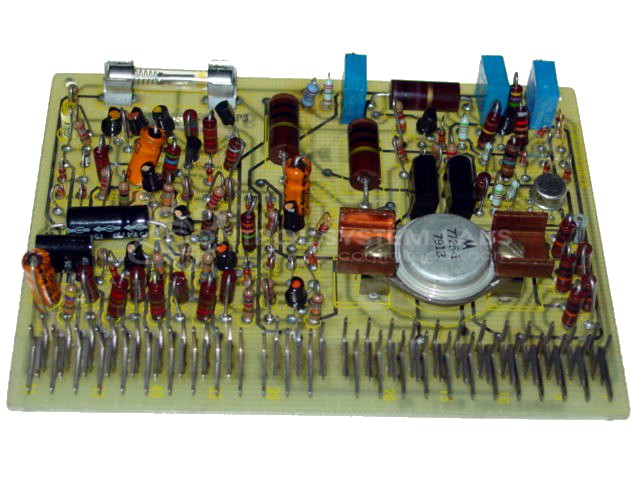
Product Overview: A proportional valve driver/amplifier card that converts control signals into regulated current to operate proportional hydraulic valves. Part of a plastic processing machine control series, it features zero, dither, and span adjustments plus fault monitor outputs. Commonly used in injection molding and production machinery.
Category: Valve Driver / Amplifier Card
Manufacturer: General Electric
Manufacturer Synonyms: GE
Manufacturer Part Number: IC3622GPDA2
Series: PM1000 Plastic Processing Machine Ctrls.
Also Known As(AKA): GPDA2
Common Failures
Common issues identified with this product include the failure of capacitors, resistors, and fuses, which can result in open circuits or no output. Missing or damaged components have also been observed during evaluation.
Repair Approach
Repairs typically involve diagnosing the failure points and replacing defective components such as capacitors, fuses, resistors, and integrated circuits as needed. After component replacement, repairs include resoldering and cleaning to ensure proper contact and function.
Testing & Quality
Each repaired unit undergoes testing, which includes output and functionality checks to confirm proper operation. Additional procedures, such as setup and calibration adjustments, are performed as required. Precautionary replacement of electrolytic capacitors may be conducted when appropriate.
Service and repair your broken General Electric part
We can repair your General Electric model IC3622GPDA2 in our facility. Let our skilled technicians get your General Electric back in operation quickly.
Step 1 - Click the green 'Repair Now' button above to add the part and then complete the RMA.
Step 2 - The RMA form will be sent to you via email. Print the RMA form and put it in a box with the item(s) for repair.
Step 3 - Ship or mail the box to the address listed on the RMA.
Once the user has seen at least one product this snippet will be visible.