




Repair
Call for price
Purchase
CSL Part Number: 106941
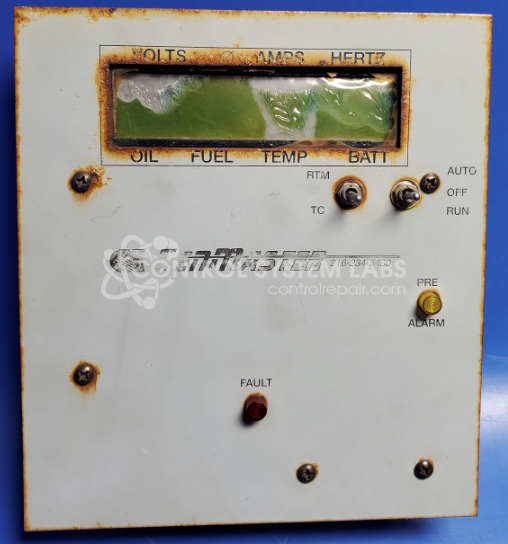
Product Overview: The GenMaster Control Panel with Display is an operator interface and monitoring station for Barber Colman Dyna 8000 control systems. It features a Varitronix 16x32 character LED display (MDLS16268C-LV-RC) and serves as the primary human-machine interface for generator control applications. The panel provides system status readouts and allows operators to monitor and adjust parameters such as throttle control and actuator functions. This workstation enables real-time feedback and control for industrial generator sets and related power generation equipment.
Category: Operator / Monitor Workstation
Manufacturer: GenMaster
Alternate Manufacturer Names: Controls Inc
Manufacturer Part Number: unknown
Also Known As(AKA): 16268C, EM100-11, ACKW11
Other Synonyms: Controls Inc
Please send in copies of wiring diagrams with the item and a detailed explanation of problem, pictures are also helpful.
Common Failures
Users often report that while the readout screen functionalities remain operative, the display itself requires replacement. Additionally, some units exhibit corrosion on components such as IC sockets and capacitors, which may affect performance.
Repair Approach
Display replacement may be available as a solution for screens that are visibly damaged. However, due to corrosion issues in certain units, repairs may not be covered under warranty. Customers are encouraged to provide any available manuals or documentation to assist with the evaluation and repair process.
Limited Repair
The GenMaster part number is only available as a limited repair at our facility. Repairs to this item may be limited due to several reasons:
- Availability of parts
- Less than 100% test ability due to required support equipment
To have us attempt a repair on your GenMaster part follow these steps:
Step 1 -
Click the Repair Now button above to add the part and complete the RMA form.
Step 2 -
Print the RMA form that is sent to your email, and put it in the box with the parts for repair.
Step 3 -
Mail the box to the address on the RMA.
After we receive your item, we will perform an inspection and an authorization to repair will be sent for your approval. Work will begin after your authorization is received.
Once the user has seen at least one product this snippet will be visible.