




Repair
Repair Price: $ 380.00
Purchase
CSL Part Number: 21733
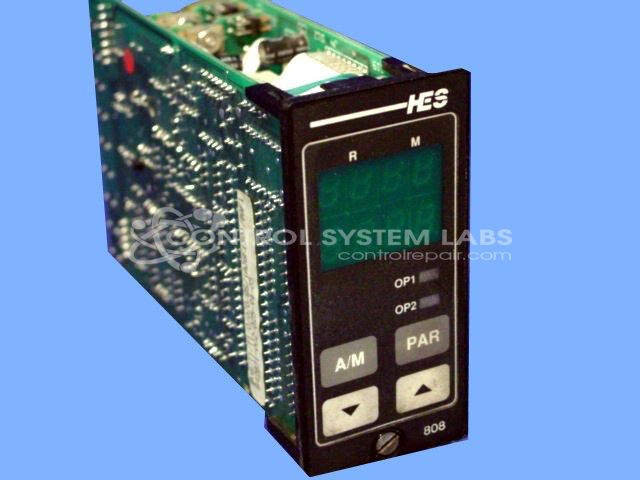
Product Overview: The Eurotherm 808 is a 1/8 DIN vertical dual display temperature controller designed for precise thermal process management. It features two independent temperature displays and accepts thermocouple or RTD inputs for monitoring and controlling heating or cooling applications. Commonly found in plastics processing, packaging machinery, food processing equipment, and industrial ovens, it provides PID control with programmable setpoints and alarm functions. The 808 series offers multiple configuration options denoted by its extended part number suffix, allowing customization for specific control requirements including input types, outputs, and communication protocols.
Category: Temperature Control
Manufacturer: Hes Electronic Systems
Alternate Manufacturer Names: EUROTHERM
Manufacturer Part Number: 808/T1/T1/0/0/0/QS
Series: 808 and 847 Series Digital Controller
Other Synonyms: EUROTHERM
The Eurotherm 808/847 Series comes in an assortment of configurations. Please submit your device using the exact part number or use this number if the exact number can not be found.
Common Failures
Units are often reported with malfunctioning up and down arrow buttons. These buttons may exhibit intermittent or unreliable operation. This issue is sometimes associated with corrosion at the keypad connector contacts.
Repair Approach
The repair process may involve cleaning corrosion from the keypad connector contacts. Depending on the evaluation findings and parts availability, some units may not be repairable. We can evaluate the item and provide a quotation before any repair work begins.
Service and repair your broken Hes Electronic Systems part
We can repair your Hes Electronic Systems model 808/T1/T1/0/0/0/QS in our facility. Let our skilled technicians get your Hes Electronic Systems back in operation quickly.
Step 1 - Click the green 'Repair Now' button above to add the part and then complete the RMA.
Step 2 - The RMA form will be sent to you via email. Print the RMA form and put it in a box with the item(s) for repair.
Step 3 - Ship or mail the box to the address listed on the RMA.
Once the user has seen at least one product this snippet will be visible.