




Repair
Repair Price: $ 1,712.00
Purchase
CSL Part Number: 23842
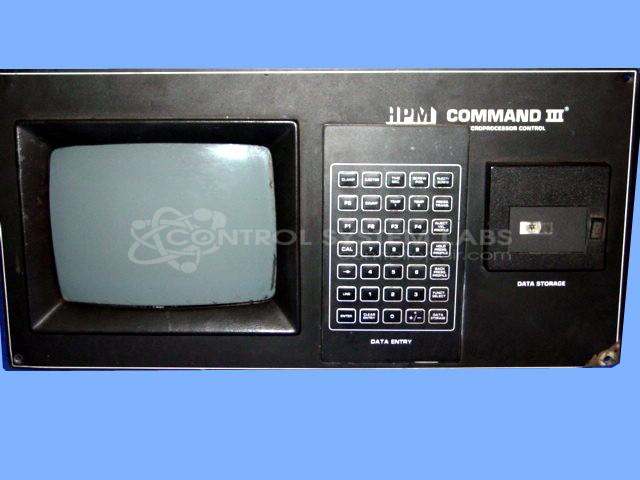
Product Overview: Operator interface combining a CRT video display, membrane keypad, and integrated tape drive for an industrial process controller. It allows operators to view machine pages, enter parameters, and load programs, commonly used in paper machine control applications.
Category: Operator & Control Panels
Manufacturer: HPM
Manufacturer Synonyms: HYDRAULIC PRESS MANUFACTURING, Yizumi
Manufacturer Part Number: COMMAND III CONTROL PANEL
Series: Command III Controller
Repair to display section & keypad only.
Common Failures
This product has been evaluated for issues including keypad malfunctions, display irregularities, and power-related failures. Reported symptoms have included high resistance in keys, difficulties with bottom screen lines, and component damage indicated by popping sounds and smoke during power-up.
Repair Approach
Repairs have involved replacing horizontal oscillators, faulty chips on the keypad interface board, and capacitors on the CRT board. Necessary connections were resoldered, and customer-supplied keypads were replaced as part of the repair process. Post-repair, units typically undergo thorough testing and burn-in periods.
Testing & Quality
Following repairs, keypad functions are tested for resistance, and the CRT picture is adjusted when necessary. Units are burn-in tested for extended periods to verify repair success and ensure all components operate correctly before return.
Limited Repair
The HPM part number is only available as a limited repair at our facility. Repairs to this item may be limited due to several reasons:
- Availability of parts
- Less than 100% test ability due to required support equipment
To have us attempt a repair on your HPM part follow these steps:
Step 1 -
Click the Repair Now button above to add the part and complete the RMA form.
Step 2 -
Print the RMA form that is sent to your email, and put it in the box with the parts for repair.
Step 3 -
Mail the box to the address on the RMA.
After we receive your item, we will perform an inspection and an authorization to repair will be sent for your approval. Work will begin after your authorization is received.
Once the user has seen at least one product this snippet will be visible.