




Repair
Repair Price: $ 1,856.00
Purchase
CSL Part Number: 86419
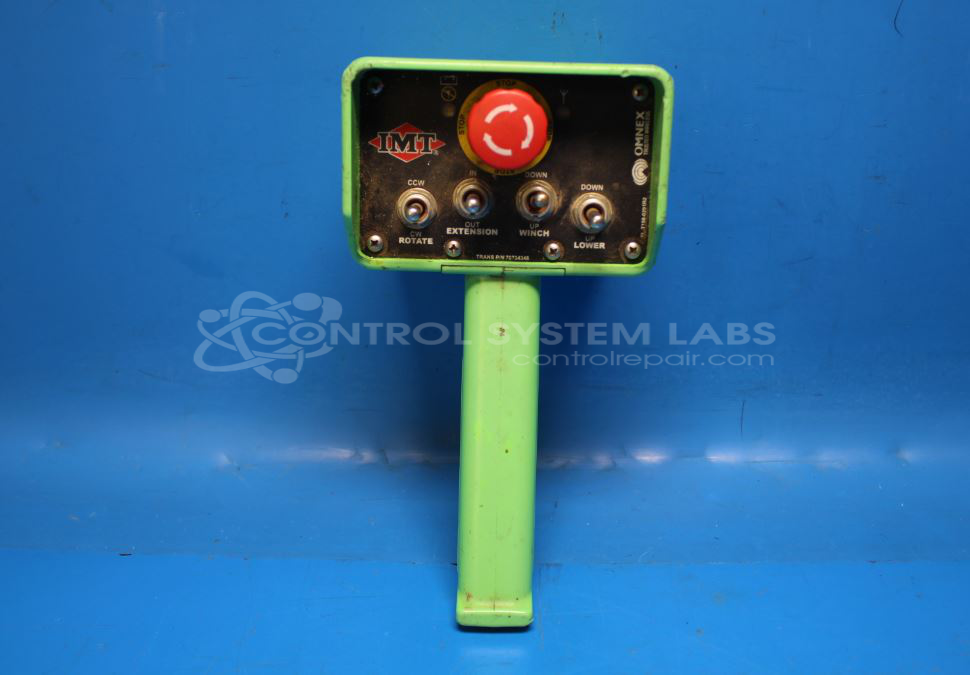
Product Overview: A handheld wireless remote controller that transmits operator commands via RF to a paired receiver, providing proportional and on/off control of functions such as boom, swing, winch, and extend movements. Commonly used to operate truck-mounted cranes and similar mobile equipment. Features a potted control board, trigger and toggle switch inputs, and battery power.
Category: Transmitter
Manufacturer: Omnex
Manufacturer Part Number: T150C-001046-0A1
Series: T150 Handheld Remote Controller
Also Known As(AKA): T150
Whether it's a broken switch, no communication, remote doesn't connect, broken case, or intermittent operation, or if it's been run over by a truck, send us your remote and we'll have you communicating. The repair price listed on the website is the normal repair price. After we receive the unit, it will be evaluated and a repair price will be quoted based on the expected repairs required. The repair price can be significantly greater if the control board needs to be extracted from the potting compound.
Common Failures
One of the prevalent issues observed is water damage leading to corrosion of wires, connectors, and components, resulting in power-up problems and RF transmission failure. In certain cases, potting compound removal caused additional damage to circuit components and traces.
Repair Approach
Repairs generally involve cleaning corrosion, replacing corroded connectors and wires, and addressing damaged components. In complex cases, the board may need to be extracted from potting material for thorough examination and repair. For some issues such as RF transmission failure, units may be returned unrepaired after diagnostic evaluation if repair is not economically feasible or technically possible.
Testing & Quality
Repaired units undergo functionality testing to verify resolution of power and connectivity issues. In some cases, signal transmission issues may be linked to external factors and require additional review.
Service and repair your broken Omnex part
We can repair your Omnex model T150C-001046-0A1 in our facility. Let our skilled technicians get your Omnex back in operation quickly.
Step 1 - Click the green 'Repair Now' button above to add the part and then complete the RMA.
Step 2 - The RMA form will be sent to you via email. Print the RMA form and put it in a box with the item(s) for repair.
Step 3 - Ship or mail the box to the address listed on the RMA.
Once the user has seen at least one product this snippet will be visible.