




Repair
Repair Price: $ 908.00
Purchase
CSL Part Number: 36453
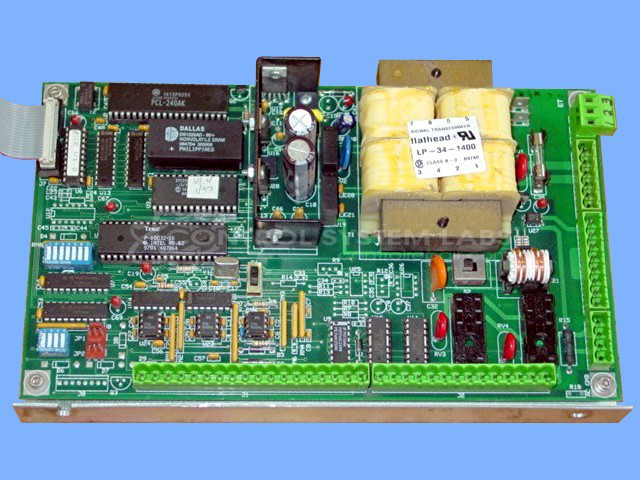
Product Overview: A microprocessor-based control board that manages labeling head operation in pressure-sensitive label applicator systems. It governs application speed and head functions through programmable parameters stored in NVRAM and EPROM, with DIP switch configuration for mode selection including manual speed adjustment. Used in industrial product labeling equipment.
Category: Control Board
Manufacturer: Quadrel Labeling Systems
Manufacturer Part Number: 20101-000
Send in Keypad/display for this repair.
Common Failures
Typical issues reported include the device being locked in service mode due to incorrect configurations, outdated non-volatile memory (NVRAM), and damage from excessive voltage leading to component failures such as cracked ferrite beads and failed tank capacitors. Incorrect DIP switch settings have also been reported.
Repair Approach
Units often require a full reset with memory clearance when configurations are misaligned or corrupted data is present. Repairs frequently involve updating EPROM and NVRAM components with verified versions. Damaged components such as ferrite beads and EMI transformers are replaced as needed, and DIP switch configurations are corrected to ensure proper operation.
Testing & Quality
After repairs, the functionality of the board is verified to ensure proper operation. Customers are advised to re-enter their specific settings and parameters, as previous memory configurations are cleared during the repair process. Proper DIP switch settings are essential for optimal functionality, and customers should verify these settings after receiving the repaired unit.
Service and repair your broken Quadrel Labeling Systems part
We can repair your Quadrel Labeling Systems model 20101-000 in our facility. Let our skilled technicians get your Quadrel Labeling Systems back in operation quickly.
Step 1 - Click the green 'Repair Now' button above to add the part and then complete the RMA.
Step 2 - The RMA form will be sent to you via email. Print the RMA form and put it in a box with the item(s) for repair.
Step 3 - Ship or mail the box to the address listed on the RMA.
Once the user has seen at least one product this snippet will be visible.