




Repair
Repair Price: $ 824.00
Purchase
CSL Part Number: 74788
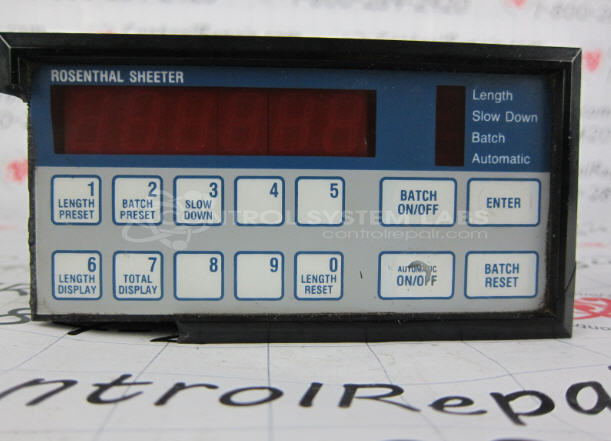
Product Overview: A dual preset, 6-digit electronic counter used to control feed and cut operations on paper sheeting machines. It features front-panel push buttons and overlay, programmable presets, and relay outputs for triggering machine cycles such as cut and feed functions.
Category: Counters
Manufacturer: Rosenthal Sheeter
Manufacturer Part Number: 58851-415
Series: 5885 Dual Preset 6 Digit Counter
Common Failures
Units have frequently encountered issues related to cracked cases, faulty switches, and button malfunctions. Symptoms include cracked exterior cases and inoperative buttons, such as "Enter", "On/Off", "Batch Reset", and others not functioning correctly. Additionally, some units exhibited input/output problems where certain commands failed to initiate the designated operations, like feeding or cutting.
Repair Approach
Repairs typically involved replacing damaged components such as cases, buttons, and switches. For button issues, faulty switches were replaced or repaired, and the overlay was often restored. In cases of operational command problems, components were cleaned, reset to factory defaults, and thoroughly tested.
Testing & Quality
Post-repair, units underwent rigorous testing to ensure functionality. This included overnight burn-in testing and verification of operational performance. In some cases, units were determined to be Beyond Economic Repair due to feed cycle failures that could not be resolved cost-effectively.
Service and repair your broken Rosenthal Sheeter part
We can repair your Rosenthal Sheeter model 58851-415 in our facility. Let our skilled technicians get your Rosenthal Sheeter back in operation quickly.
Step 1 - Click the green 'Repair Now' button above to add the part and then complete the RMA.
Step 2 - The RMA form will be sent to you via email. Print the RMA form and put it in a box with the item(s) for repair.
Step 3 - Ship or mail the box to the address listed on the RMA.
Once the user has seen at least one product this snippet will be visible.