



Repair
Repair Price: $ 876.00
Purchase
CSL Part Number: 109381
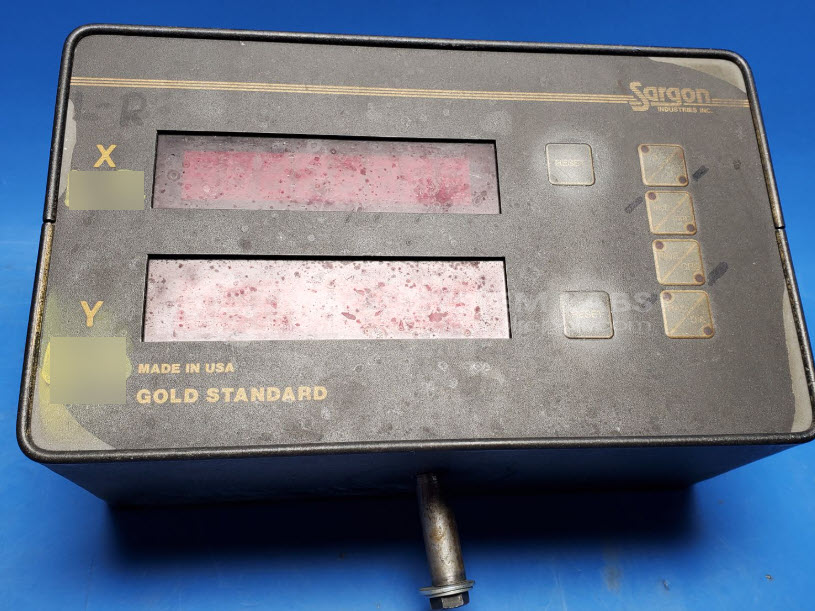
Product Overview: The Gold Standard 2 Axis Digital Readout Control (Model 652) is a digital position indicator manufactured by Sargon Industries for machine tool applications. It provides real-time X and Y axis position monitoring on lathes, mills, grinders, and similar precision machining equipment. The unit features a front-panel LED display with tactile keypad controls for axis reset and zeroing functions. It interfaces with linear encoders or scales to convert mechanical position into digital readout values, enabling operators to accurately track workpiece positioning during machining operations.
Category: Meters / Gauges / Readouts
Manufacturer: Sargon Industries
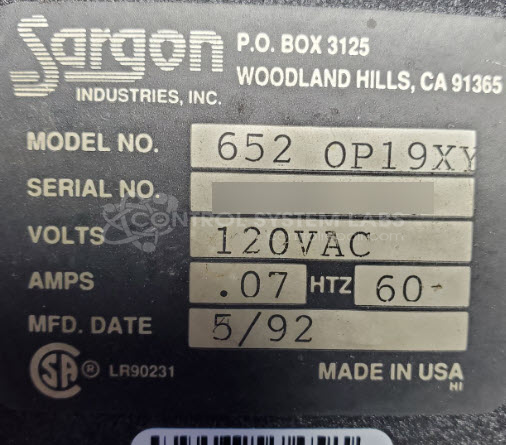
Manufacturer Part Number: 652 OP19XY
Series: Gold Standard 2 Axis Digital Readout Control
Please include a wiring diagram, manuals and if possible a small scale to use as an aid in repair to test with it.
Common Failures
This product has experienced issues such as defective components and specific operational failures. Common symptoms include bent LEDs on the front panel and malfunctioning Y-axis reset functions. Some units also showed discrepancies in keypad resistance values.
Repair Approach
Repairs typically involve replacing defective components, such as elements related to input interfaces. For issues with the Y-axis reset, adjustments are made to correct resistance discrepancies. Defective parts are systematically replaced and verified for consistency in performance.
Testing & Quality
Repaired units undergo comprehensive diagnostic testing, including burn-in tests with and without load. Keypads and output ports are specifically tested to ensure functionality. Each unit undergoes review by technicians to confirm repair quality before being returned.
Service and repair your broken Sargon Industries part
We can repair your Sargon Industries model 652 OP19XY in our facility. Let our skilled technicians get your Sargon Industries back in operation quickly.
Step 1 - Click the green 'Repair Now' button above to add the part and then complete the RMA.
Step 2 - The RMA form will be sent to you via email. Print the RMA form and put it in a box with the item(s) for repair.
Step 3 - Ship or mail the box to the address listed on the RMA.
Once the user has seen at least one product this snippet will be visible.