






Repair
Call for price
Purchase
CSL Part Number: 80577
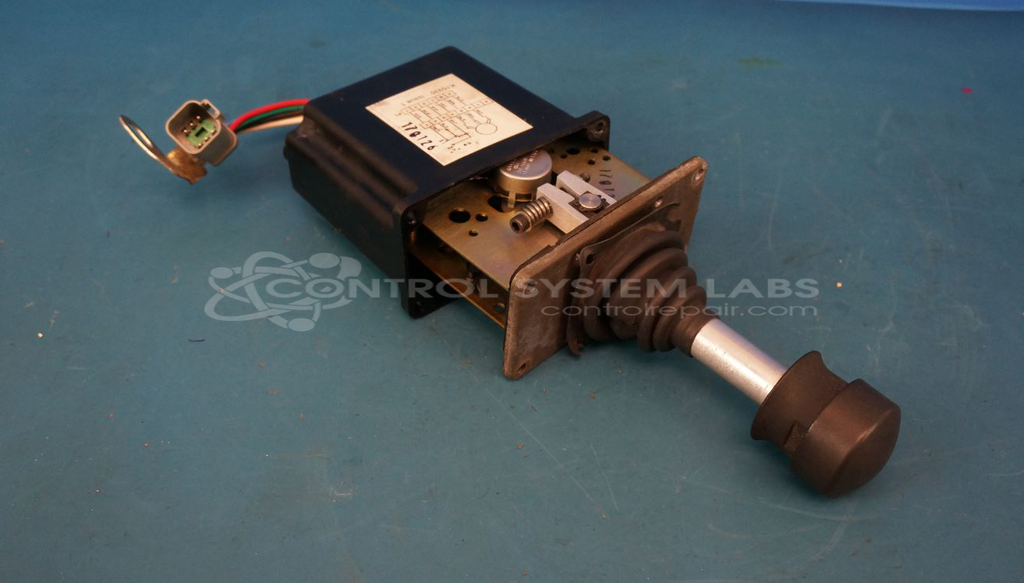
Product Overview: A hand-operated control handle joystick that converts lever movement into proportional electrical output via internal potentiometers for directional and speed control. Featuring a protective rubber boot, spring-return-to-neutral mechanism, and gear assembly, it is commonly used in mobile and industrial equipment for operator directional and throttle control.
Category: Joystick / Controller
Manufacturer: Sauer-Danfoss
Manufacturer Part Number: MCH42BE8248
Series: MCH Series Joystick - Control Handle
Some repair parts take 2 weeks plus delivery to receive.
Common Failures
Several common issues have been identified with this product type. These include worn plastic gears, missing gaskets, damaged boots and wire insulation, and control handle concerns where the unit may shift position unexpectedly.
Repair Approach
Repairs typically involve replacing worn or missing components, such as gears, gaskets, boots, and hardware. Additional steps may include alignment, securing assemblies, addressing wiring concerns, and applying lubrication as needed. When concerns cannot be initially verified, comprehensive maintenance including cleaning and testing is performed to support proper functionality.
Testing & Quality
Each repair is followed by testing appropriate to the unit type. This may include electrical testing, resistance measurements, and bench testing of repaired units. Quality checks are performed to verify that the unit is serviceable before return.
Service and repair your broken Sauer-Danfoss part
We can repair your Sauer-Danfoss model MCH42BE8248 in our facility. Let our skilled technicians get your Sauer-Danfoss back in operation quickly.
Step 1 - Click the green 'Repair Now' button above to add the part and then complete the RMA.
Step 2 - The RMA form will be sent to you via email. Print the RMA form and put it in a box with the item(s) for repair.
Step 3 - Ship or mail the box to the address listed on the RMA.
Once the user has seen at least one product this snippet will be visible.