




Repair
Repair Price: $ 1,332.00
Purchase
CSL Part Number: 81941
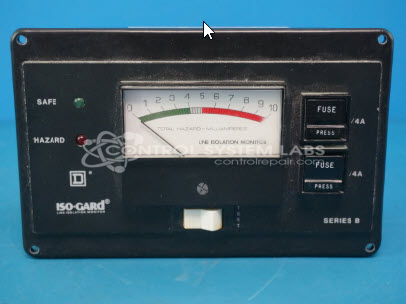
Product Overview: A line isolation monitor that continuously measures total hazard current in ungrounded power systems, triggering visual and audible alarms when leakage approaches unsafe levels. Rated for 240V with a 5 mA alarm threshold, it is commonly used in hospital operating rooms and other isolated power environments.
Category: Line Isolation Monitor
Manufacturer: Square D
Alternate Manufacturer Names: Isogard, Schneider Electric
Manufacturer Part Number: 63010-705-64
Series: Iso-Gard Monitors
Brand: Square D
Other Synonyms: Isogard, Schneider Electric
Why replace your Iso-Gard monitoring system? Repair it at a fraction of the cost!
Common Failures
Customers have reported that the unit does not go into alarm when the test button is pressed. During evaluation, it was found that the gauge reading goes to 5mA and then stops, indicating a need for calibration.
Repair Approach
The issue was addressed by recalibrating the unit. This involved a comprehensive testing process to verify reliable operation. This includes testing the unit at 2mA, 3mA, 5mA, and 8mA. Additionally, the unit underwent a burn-in process lasting one hour to confirm stability and functionality.
Testing & Quality
After recalibration, the unit was thoroughly tested to verify it met operational standards. This testing process confirms the resolution of the reported alarm issue.
Service and repair your broken Square D part
We can repair your Square D model 63010-705-64 in our facility. Let our skilled technicians get your Square D back in operation quickly.
Step 1 - Click the green 'Repair Now' button above to add the part and then complete the RMA.
Step 2 - The RMA form will be sent to you via email. Print the RMA form and put it in a box with the item(s) for repair.
Step 3 - Ship or mail the box to the address listed on the RMA.
Once the user has seen at least one product this snippet will be visible.