


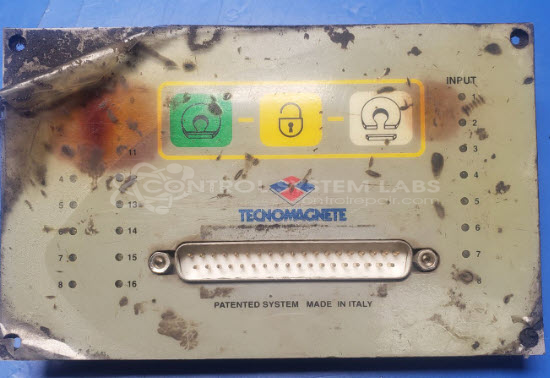
Tecnomagnete ST200 PCR1 Magnetic Controller Operator Panel
Repair
Call for price
Purchase
CSL Part Number: 104985
Product Overview: The Tecnomagnete ST200 PCR1 is an operator interface panel for the ST200 series magnetic controller system. It provides manual control and status indication for electromagnet lifting and material handling equipment. The panel features a membrane keypad with integrated LED indicators and communicates with the main controller via a DB-37 connector. It includes input monitoring for safety interlocks and operational status, commonly used in metal fabrication environments with plasma cutting tables, material transfer systems, and automated lifting applications.
Category: Operator & Control Panels
Manufacturer: Tecnomagnete
Manufacturer Part Number: ST200 PCR1
Series: ST200 Magnetic Controller
Brand: ST200
Also Known As(AKA): 18052010; ST200PLC; ST200PLC_3; ST200_PLC
Common Failures
Common symptoms reported for these boards include errors that may prevent proper operation. These issues can stem from component wear, physical damage to the unit, or contamination such as metal fragments that may cause electrical faults.
Repair Approach
Our repair process typically involves replacing worn or faulty components and addressing any physical damage found during evaluation. Contamination is cleaned, damaged circuit board traces are repaired where possible, and the unit is restored to serviceable condition.
Testing & Quality
Following repair, the board undergoes diagnostic testing to verify proper operation of components and connections. Testing is conducted to confirm the unit functions as expected. Customers may need to reinitialize or reconfigure their equipment upon reinstallation, depending on the specific unit and application.
Service and repair your broken Tecnomagnete part
We can repair your Tecnomagnete model ST200 PCR1 in our facility. Let our skilled technicians get your Tecnomagnete back in operation quickly.
Step 1 - Click the green 'Repair Now' button above to add the part and then complete the RMA.
Step 2 - The RMA form will be sent to you via email. Print the RMA form and put it in a box with the item(s) for repair.
Step 3 - Ship or mail the box to the address listed on the RMA.
Once the user has seen at least one product this snippet will be visible.