




Repair
Repair Price: $ 776.00
Purchase
CSL Part Number: 12402
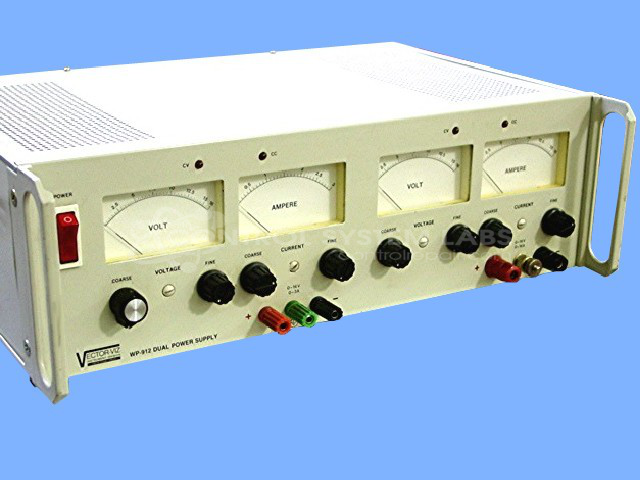
Product Overview: A dual-channel adjustable DC power supply delivering 0-16VDC per channel with variable current output up to roughly 10A. It features coarse and fine voltage and current regulation, analog meters, thermal-controlled cooling fan, and constant-voltage/constant-current operation for powering and testing electronic devices and components on the bench.
Category: Power Supply
Manufacturer: Vector
Manufacturer Part Number: WP-912
Also Known As(AKA): THE VECTOR GROUP
Power supplies are tested with a minimum 4-hour burn-in, under load.
Common Failures
Units received for service have exhibited various issues, including power supply failures, control circuit problems affecting display and output accuracy, and reduced output on one or more channels. Additional reported issues include fuse holder damage and control circuit faults affecting adjustment capability.
Repair Approach
Typical repairs may involve replacement of power supply components, fuses, control circuitry components, and electrolytic capacitors as needed based on evaluation findings. Control potentiometers are replaced when control issues are identified during testing. Component replacement is determined on a case-by-case basis following evaluation.
Testing & Quality
Repaired units are tested to verify functionality and address reported issues. Testing procedures include bench testing under load, verification of control adjustments, meter calibration checks, and voltage and current regulation testing. Extended operational testing is performed as appropriate to confirm stable operation prior to return shipment.
Service and repair your broken Vector part
We can repair your Vector model WP-912 in our facility. Let our skilled technicians get your Vector back in operation quickly.
Step 1 - Click the green 'Repair Now' button above to add the part and then complete the RMA.
Step 2 - The RMA form will be sent to you via email. Print the RMA form and put it in a box with the item(s) for repair.
Step 3 - Ship or mail the box to the address listed on the RMA.
Once the user has seen at least one product this snippet will be visible.