


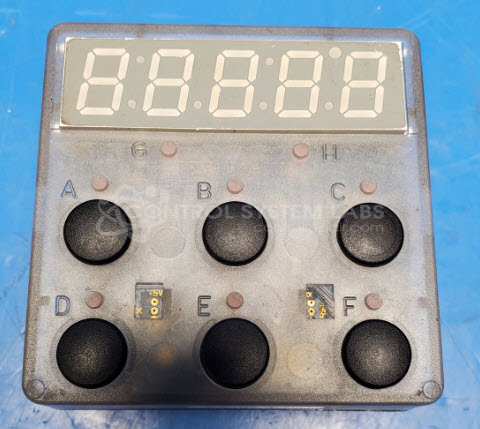
Watlow F2HC-1111-11UC Temperature Controller
Repair
Repair Price: $ 492.00
Purchase
CSL Part Number: 102289
Product Overview: The Watlow F2HC-1111-11UC is a specialized temperature controller from the MiniChef 2000 Cooking Controller series, designed primarily for commercial food service equipment. It accepts K-type thermocouple inputs and controls heating elements to maintain set temperatures in smokers, ovens, and similar cooking appliances. The controller features programmable outputs for heaters and auxiliary functions like smoker elements, with multi-button interface for temperature setpoint and operation mode selection. Common applications include commercial smokers and cooking equipment requiring precise temperature regulation.
Category: Temperature Control
Manufacturer: Watlow
Manufacturer Part Number: F2HC-1111-11UC
Series: MiniChef 2000 Cooking Controller
Also Known As(AKA): F2HC SERIES
Please include the make a model of the equipment this unit was removed from.
Common Failures
Two primary issues have been identified in recent repair tasks. One involves a failure of the board to sense temperature from a thermocouple due to corrosion. The other issue pertains to a heating element that fails to reach the desired temperature, attributed to corrosion on a connector.
Repair Approach
The repair of the circuit board involved addressing broken traces leading to the thermocouple input as a result of corrosion. For the heating element issue, corrosion was cleaned from connector pins, and conformal coating was reapplied to help protect against future damage.
Testing & Quality
Initial attempts to test the temperature sensing board were unsuccessful due to additional damage and connectivity issues. The heating element unit passed testing, verifying its ability to activate and control heating outputs. All buttons and functions were verified in the latter case.
Service and repair your broken Watlow part
We can repair your Watlow model F2HC-1111-11UC in our facility. Let our skilled technicians get your Watlow back in operation quickly.
Step 1 - Click the green 'Repair Now' button above to add the part and then complete the RMA.
Step 2 - The RMA form will be sent to you via email. Print the RMA form and put it in a box with the item(s) for repair.
Step 3 - Ship or mail the box to the address listed on the RMA.
Once the user has seen at least one product this snippet will be visible.