




Repair
Repair Price: $ 416.00
Purchase
CSL Part Number: 614
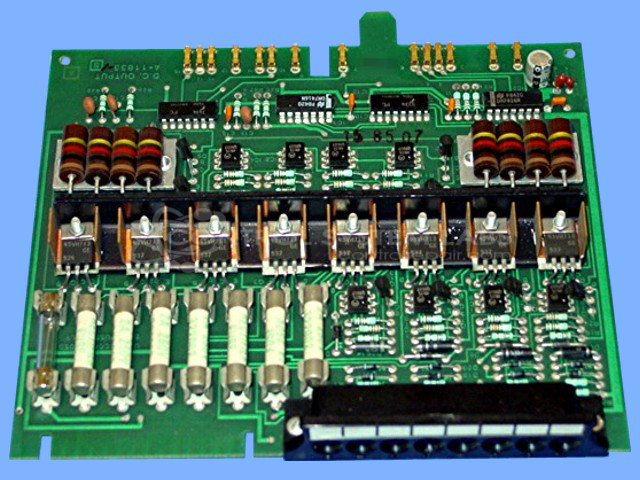
Product Overview: A DC output card for a modular process control system, providing multiple transistor-driven DC output channels to actuate field devices. Used in industrial automation and paper machine controls, it features onboard LED status indication and optically isolated switching outputs.
Category: Barber Colman MACO Controls
Manufacturer: Barber-Colman
Manufacturer Synonyms: Barber Coleman, Barbercolman, Invensys
Manufacturer Part Number: A-11833-0-1
Series: MACO III
Brand: Barber-Colman
Also Known As(AKA): A11833
Common Failures
The most frequent issues encountered with this product include outputs that are stuck on or channels that remain active continuously. These problems are often traced back to faulty transistors, zener diodes, or capacitors. Defective components such as output transistors and zener diodes have been a recurring cause of operation failures.
Repair Approach
Typical repairs involve replacing malfunctioning components such as transistors, diodes, and capacitors. Repairs may include reflowing cold solder joints and replacing faulty zener diodes and capacitors. Thorough cleaning and testing are part of the repair procedure.
Testing & Quality
Post-repair, comprehensive testing is conducted to verify the operation of LEDs, inputs, and outputs. This includes burn-in tests that are typically carried out for varied durations to ensure stability and reliability of the repair work.
Service and repair your broken Barber-Colman part
We can repair your Barber-Colman model A-11833-0-1 in our facility. Let our skilled technicians get your Barber-Colman back in operation quickly.
Step 1 - Click the green 'Repair Now' button above to add the part and then complete the RMA.
Step 2 - The RMA form will be sent to you via email. Print the RMA form and put it in a box with the item(s) for repair.
Step 3 - Ship or mail the box to the address listed on the RMA.
Once the user has seen at least one product this snippet will be visible.